How to back up using MobileMe’s Backup utility — Roman Loyola, Macworld, February 18, 2011
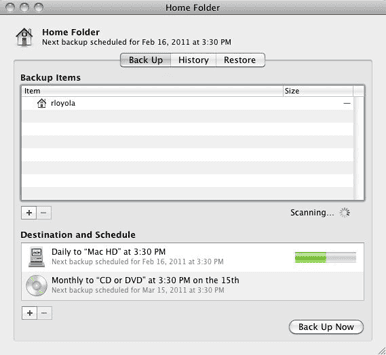
Roman Loyola’s first-hand Macworld tutorial identifies the then-current Backup version as 3.2 and walks through creating a Home Folder plan, selecting backup destinations and schedules, and managing existing data. Its native Plan overview window screenshot shows backup items, History and Restore tabs, and separate daily hard-disk and monthly optical-disc destinations. The complete returned article HTML and this exact linked PNG are retained. Other images, scripts and external resources linked by the web page are not implied to be embedded or owned by this file.
- Date
- February 18, 2011
- Format
- Native HTML and original linked image
- Source
- Roman Loyola / Macworld — first-hand software tutorial
February 18, 2011 is the article’s original publication date, explicitly printed in its metadata; migration/modification timestamps are not substituted for publication.
Image: Roman Loyola / Macworld; Apple Backup interface · Original publication, photograph and depicted Apple/Claris interface or packaging rights reserved by their respective creators; no open reuse license asserted. ↗
Details
Source & credits
- Material
- Story
- Date
- February 18, 2011
- Format
- Native HTML and original linked image
- Source files
- 2
- Preserved files
- 2
- Source
- Roman Loyola / Macworld — first-hand software tutorial
- Credit
- Roman Loyola / Macworld; depicted Apple Backup interface
- Rights / access
- Original publication, photograph and depicted Apple/Claris interface or packaging rights reserved by their respective creators; no open reuse license asserted.
- Roman Loyola / Macworld — first-hand software tutorial Original source
Files
2 files
- mobileme_backup.html text/html
- 157538-backup_plan_details_original.png image/png